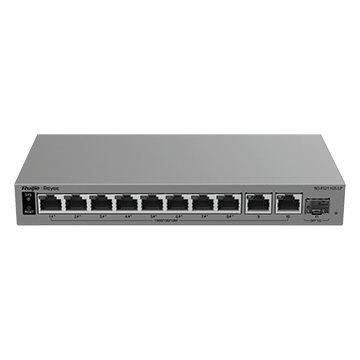
Front View
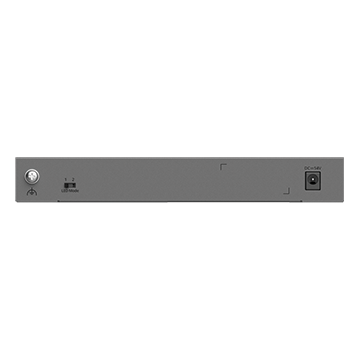
Rear View
11 Port Gigabit Layer 2 Smart Cloud-Managed PoE Network Switch (8x PoE+, 2x RJ45 GbE, 1x SFP), 70 W
RG-ES211GS-LP
Product Summary
The RG-ES211GS-LP is an 11-port Gigabit Layer 2 smart cloud-managed PoE switch designed for cost-effective business, CCTV and commercial networks. It features eight Gigabit PoE/PoE+ ports with a 70 W power budget, two additional Gigabit Ethernet ports and one Gigabit SFP uplink. IP camera recognition, PoE watchdog and AI-powered failover improve network reliability, while lifetime-free Ruijie Cloud management enables convenient remote configuration, monitoring and maintenance.
View More Networking and Data
3-Year Manufacturer’s Warranty
For full terms & conditions, please see – Ruijie Warranty T&Cs.

Features and Benefits
- Eight Gigabit PoE/PoE+ ports with a 70 W power budget provide high-speed data and power for cameras, access points and other PoE devices.
- Two additional Gigabit Ethernet ports and one Gigabit SFP port provide flexible copper and fibre uplink connectivity.
- IP camera recognition and PoE watchdog simplify CCTV management and automatically restart unresponsive cameras.
- Uninterrupted PoE during a warm restart keeps connected devices powered, helping minimise network and surveillance downtime.
- VLANs, port isolation, cable testing, traffic controls and AI-powered failover improve network security, troubleshooting and reliability.
- Lifetime-free Ruijie Cloud and Reyee App management enable convenient remote configuration, monitoring and maintenance.
Specifications
Hardware Specifications
System Specifications
| Flash memory | 8 MB |
| Forwarding rate | 16.37 Mpps |
| Switching capacity | 22 Gbps(bit/s) |
Product Information
| Warranty | 3 years |
Port Specifications
| Total number of RJ45 ports | 10 |
| Total number of optical ports | 1 |
| Number of 1GE SFP ports | 1 |
| Number of 10/100/1000BASE-T ports | 10 |
| Reset button | 1 |
| DIP switch | LED mode switch toggled to left (Mode 1): The port LED status indicates the status of traffic transmission. Solid green means that the port is link up, while blinking green means that the port is transmitting and receiving data. LED mode switch toggled to right (Mode 2): The port LED status indicates the PoE status. Solid green means that the port is supplying power, while blinking green means that the port is in power overload state. |
Power Supply and Consumption
| PoE Out standard | PoE/PoE+ (IEEE 802.3af/at) |
| Number of PoE Out ports | 8 |
| Number of PoE/PoE+ Out ports | 8 |
| PoE budget | 70 W |
| PoE power pins | 1–2 (+), 3–6 (-) |
| Power input | DC adapter: • Rated input voltage: 100 V AC to 240 V AC, 50 Hz to 60 Hz • Maximum input voltage: 90 V AC to 264 V AC, 47 Hz to 63 Hz • Rated input current: 1.5 A Output: • Rated output voltage: 54 V DC • Maximum output current: 1.48 A |
| Maximum power consumption | 8 W (with no PoE load) 78 W (with full PoE load) |
| Power supply | DC power adapter |
Dimensions and Weight
| Casing | Metal |
| Product dimensions (W x D x H) | 205 mm x 105 mm x 28 mm (8.07 in. x 4.13 in. x 1.10 in.) |
| Weight | 0.45 kg (0.99 lbs) (without packaging materials) |
| Shipping weight | 1.29 kg (2.84 lbs) |
Environment and Reliability
| Fan | Fanless design |
| Cooling | Natural cooling |
| Mounting options | Wall/Desk |
| Hot swapping of cables | Hot swapping supported by the service port and power connector |
| MTBF | 200,000 hours |
| Operating temperature | 0°C to 40°C (32°F to 104°F) |
| Storage temperature | –40°C to +70°C (–40°F to +158°F) |
| Operating humidity | 10% RH to 90% RH (non-condensing) |
| Storage humidity | 5% RH to 95% RH (non-condensing) |
| Altitude | –500 m to +5,000 m (–1,640.42 ft. to +16,404.20 ft.) |
| ESD protection | Air discharge: 8 kV Contact discharge: 6 kV |
| Surge protection | Service port: ±6 kV for common mode Power connector: ±4 kV for common mode and ±2 kV for differential mode |
Certification and Regulatory Compliance
| EMC | EN 55032 EN IEC 61000-3-2 EN 61000-3-3 EN 55035 EN 300 386 |
| Safety compliance | EN 62368-1 IEC 62368-1 |
| Certification | CE, CB |
Software Specifications
Authentication
| RADIUS | No |
| 802.1X authentication | No |
Basic Configurations
| PoE watchdog | Yes |
| Uninterruptible power supply upon warm start | Yes |
| Online upgrade | Yes |
Network Management and Monitoring
| Mirroring | Yes |
| HTTP login | Yes |
| HTTPS login | Yes |
| SON | Yes |
| Syslog | No |
| Camera detection | Yes |
| eWeb management | Yes |
| Ruijie Cloud management | Yes |
| Ruijie Reyee App management | Yes |
| SNMPv1, v2c, and v3 | No |
IP Routing
| IPv4 static route | No |
| IPv6 static route | No |
| OSPFv2 | No |
| OSPFv3 | No |
Ethernet Switching
| Maximum number of VLANs | 32 |
| Maximum number of MAC address entries | 16000 |
| Interface flow control | Yes |
| IEEE 802.1Q VLAN | Yes |
| LLDP | No |
| LLDP-MED | No |
| Static MAC address | Yes |
| Static aggregation | Yes |
| LACP | No |
| Inbound or outbound rate limiting based on interface traffic | Yes |
Interface
| Jumbo frame length (MTU) | 10240 bytes |
| EEE | Yes |
| Cable test | Yes |
Multicast
| IGMPv1 snooping | No |
| IGMPv2 snooping | No |
| Basic IGMPv3 snooping | No |
| Full IGMPv3 snooping | No |
| IGMP filtering | No |
| IGMPv1, v2, and v3 | No |
System Performance Capacity
| Recommended camera limit | 200W H265: 100 400W H265: 50 |
Gateway Features
| 802.1p priority-based traffic classification | No |
| DSCP priority-based traffic classification | No |
Security
| Port isolation | Yes |
| Broadcast storm control | Yes |
| Multicast storm control | Yes |
| Unknown unicast storm control | Yes |
| DHCP snooping | Yes |
| Standard ACL | No |
| Extended MAC ACL | No |
| Extended IP ACL | No |
| IPv6 ACL | No |
| ARP anti-spoofing | No |
| CPU Protection Policy | Yes |
IP Service
| ARP | No |
| IPv4 ping | Yes |
| IPv4 traceroute | No |
| ICMPv6 | No |
| IPv6 ping | No |
| IPv6 traceroute | No |
| DNS client | Yes |
| DHCP client | Yes |
Package Contents
Manual
| User Manual | 1 |
| Warranty Card | 1 |
Accessories
| Power cord | 1 x 0.8 m (2.62 ft.), 1 x 1 m (3.28 ft.), 1 x 1.2 m (3.94 ft.) or 1 x 1.5 m (4.92 ft.) Note: There are four power cord lengths. Please refer to the actual delivery. |
Device
| Device | 1 |
Downloads
Product Image Product Image (Back) Brochure Full Product CatalogueView and download User Documents and Manuals directly from Reyee under the 'Resources' tab.