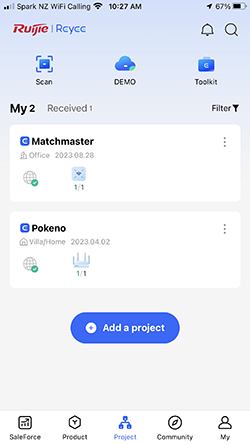
1. Open the Ruijie Cloud App and choose the project you wish to add the Guest Wi-Fi to.
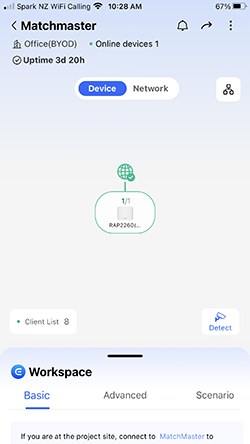
2. Select ‘Workspace’ at the bottom of the screen.
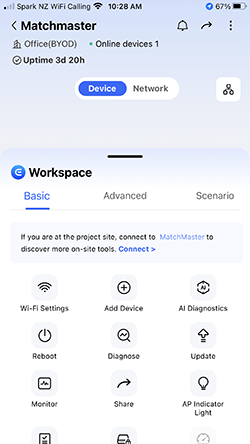
3. Select ‘Wi-Fi Settings
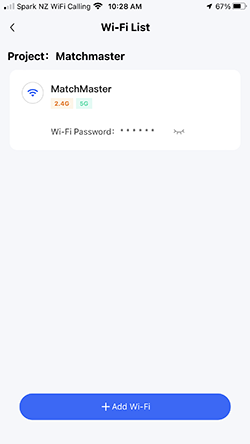
4. Select ‘+Add Wi-Fi’. If you are adding to a router just turn on ‘
Guest Wi-Fi’
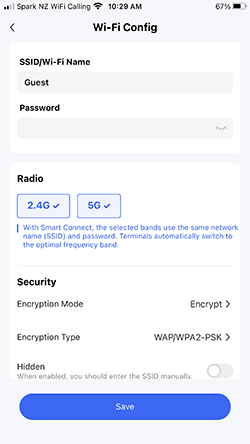
5. Create an SSID (Wi-Fi Name) and create a password if required and ‘Save’
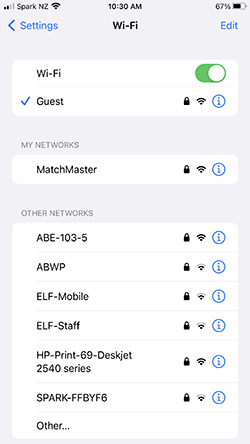
6. Check your device’s Wi-Fi setup to see the newly created ‘Guest’ Wi-Fi
Page Feedback
Products related to page: RG-RAP1200(F), RG-RAP1200(P), RG-RAP2200(E), RG-RAP2200(F), RG-RAP2260, RG-RAP2260(E), RG-RAP2260(G), RG-RAP2260(H), RG-RAP2266, RG-RAP6260(G), RG-RAP6262, RG-RAP6262(G)
Page last updated: 29 July 2026, 3:41 PM (AEST)